


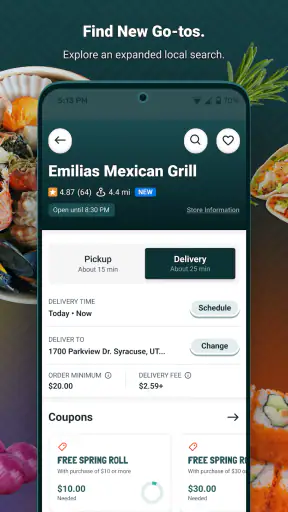
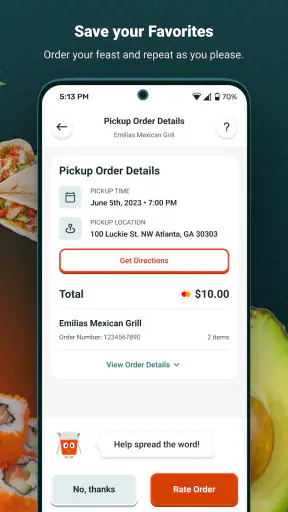

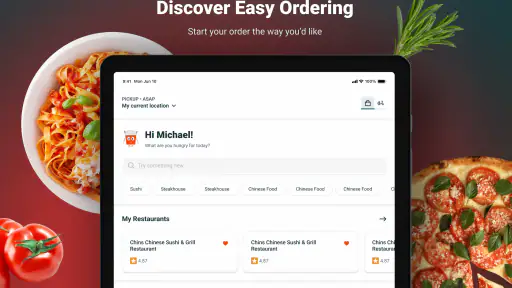
I found Beyond Menu most useful when I treated it as a practical bridge between deciding what to eat and placing an order with a nearby restaurant. It is a free Food & Drink app from BeyondMenu, built around pickup and delivery rather than recipes, meal planning, or grocery shopping. That focus makes it easy to understand: choose a local restaurant, browse its menu, and move toward an order without jumping between several unrelated services.
My overall impression is positive, especially for people who want a straightforward way to look through nearby restaurant options. The app has reached over a million installs, with a 4.7 average from around 119 thousand ratings and roughly 37 thousand written reviews. Those figures suggest that it has become a familiar tool for many diners, but popularity should not be confused with universal convenience. The real question is whether its browsing and ordering flow fits the way you eat, move, read, hear, and make decisions.
How Beyond Menu feels to use in everyday situations
Readability and navigation when you are choosing food
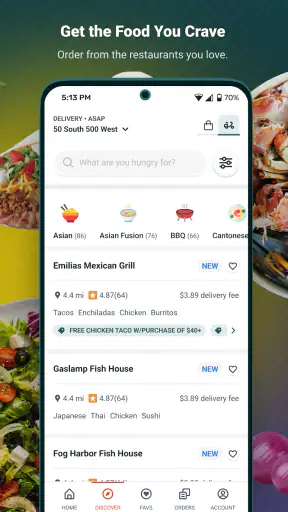
The strongest part of Beyond Menu is its clear purpose. I do not open it expecting to discover cooking ideas or compare supermarket ingredients. I open it when I want to see restaurants near me and decide between pickup and delivery. Keeping that goal in view makes the experience less mentally demanding than using a broad marketplace filled with unrelated services.
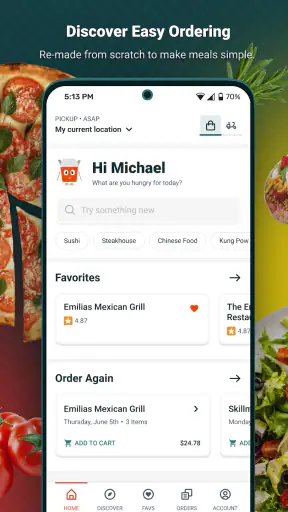
For a first-time user, the useful mental model is simple: location determines what is relevant, the restaurant page gives you the menu, and the order process handles the final choices. That structure is helpful for someone who becomes tired or distracted by too many categories. It also suits a quick decision during a lunch break, when I would rather scan familiar dishes than spend time learning a complicated interface.
I found that menu browsing works best when I already know roughly what I want. Searching for a type of meal or opening a restaurant I recognize feels more efficient than exploring without a plan. If you are comparing several places, take a moment to check the full menu rather than judging a restaurant by its first visible items. This is a small habit, but it reduces the chance of choosing too quickly and then discovering that the dish you wanted is listed elsewhere on the menu.
People with reading difficulties may appreciate the app’s focused task, although food ordering still involves a substantial amount of text. Restaurant names, dish descriptions, customization choices, fees, and checkout details all require careful attention. I would not describe the experience as effortless for someone who struggles with dense written information. The app can simplify the search for a restaurant, but it cannot remove the need to understand an order before submitting it.
One practical approach is to make the decision in stages. First choose the restaurant, then read the dish details, then review the basket from top to bottom. I find this safer than adding items rapidly while changing my mind. It is particularly useful when ordering for more than one person, because separate choices can otherwise blur together by the time you reach checkout.
The app is also more approachable when I use it with a specific purpose, such as finding dinner near home or arranging a pickup on the way back from work. Open-ended browsing can become less comfortable if many restaurants appear and I have no clear preference. In that situation, a restaurant’s own app may be better when I already know exactly where I want to order, while Beyond Menu is more useful for local discovery.
Motor and sensory considerations during ordering
Ordering food on a phone is an interaction-heavy task even when the app itself is uncomplicated. It involves tapping small menu controls, selecting options, adjusting quantities, entering or checking delivery details, and confirming the final basket. For someone with limited dexterity, tremors, or difficulty maintaining precise touch control, each extra customization step can increase effort.
I recommend slowing down at the basket rather than trying to complete the entire process quickly. A deliberate review helps catch accidental quantity changes, unwanted options, or a dish added twice. This is not just good ordering practice; it is a useful way to reduce the number of precise corrections needed later. If a person is helping someone else place an order, reading each selected item aloud can make the review more dependable without taking control away from the person choosing the meal.
Sensory needs also matter. A food-ordering app can be used in a quiet room, on public transport, or in a noisy kitchen, but those situations do not offer the same level of comfort. Someone who is sensitive to visual clutter may prefer opening one restaurant at a time instead of scanning many choices. Someone who finds phone conversations difficult may value the ability to work through the order digitally, although the restaurant may still need to resolve a problem through its own contact process.
For users with low vision, the most important practical safeguard is to enlarge the phone’s text and display settings if needed, then check whether menu lines remain understandable without excessive scrolling. Larger text can improve comfort, but it may also cause more wrapping and make a long menu slower to scan. I would test this before relying on the app for a complicated group order. The experience may be manageable for a short order but tiring when every item has several choices.
People who are deaf or hard of hearing may find a visual ordering route more comfortable than relying on a phone call, particularly when the order is routine and the restaurant information is clear. However, an app cannot guarantee that every issue will stay inside the visual flow. If a restaurant needs clarification, the user may still face a communication barrier. I would therefore avoid placing a time-sensitive order until I had checked the details carefully and understood what would happen if the restaurant could not fulfill a request.
For users with cognitive disabilities, the best workflow is to reduce decisions before opening the app. Decide whether the priority is pickup or delivery, choose a spending limit privately, and identify any dietary or ingredient questions that need attention. This turns the app from an open-ended search into a short sequence of manageable tasks. I found that this preparation matters more than trying to browse every available restaurant.
Pickup, delivery, and access in real-life contexts
Beyond Menu is particularly convenient when mobility, time, weather, or distance makes restaurant shopping difficult. A person recovering at home, a parent caring for a child, or someone working late can use the same basic restaurant-search idea without traveling first. Pickup can also be helpful for people who want to avoid waiting inside a busy restaurant, while delivery removes the journey altogether.
A realistic example is a weekday evening when I am tired and do not want to cook. I can use the app to inspect nearby restaurants, choose between collecting the order and having it brought to me, and review the basket before committing. If I am ordering for a household, I would ask everyone for their choices first and then build one order carefully. That avoids repeatedly reopening restaurants and reduces the chance of missing an item.
Pickup is not automatically the more accessible option. It may involve walking to a counter, navigating steps, waiting in a crowded area, or carrying containers. Delivery may be easier physically but can create its own complications, such as needing to hear a doorbell, reach an entrance, or communicate with a courier. I would choose based on the person’s actual environment rather than assuming that one method is always inclusive.
For someone with limited energy, the app’s value lies in reducing unnecessary travel and decision-making, not in solving every part of the meal experience. A user may still need help opening packaging, transferring food to a plate, or storing leftovers. If hot food, strong smells, or unfamiliar ingredients are sensory concerns, reading the menu carefully before ordering becomes more important than speed.
Beyond Menu can also help when a group has different needs, but the person placing the order has to coordinate them. I would keep special requests short and clear, and I would avoid assuming that a written note will solve a serious allergy or medical concern. For high-risk dietary restrictions, direct confirmation with the restaurant is the safer approach. The app can organize the order, but the restaurant remains responsible for preparing it accurately.
Travel and location changes are another consideration. The app is designed around local restaurants, so it makes the most sense when I am ordering in a familiar area or have a clear delivery location. If I am visiting somewhere new, I would verify the address and restaurant details before building a large basket. That simple check prevents wasting time on an order connected to the wrong area.
Where the experience can still create barriers
The biggest limitation is that the app sits between the customer and independent restaurants, so the quality of the experience can vary from one menu to another. A clean ordering flow cannot fully compensate for unclear dish descriptions, inconsistent customization choices, or information that requires a follow-up conversation. I would be cautious when the menu leaves important questions unanswered.
Another barrier is the amount of attention needed at checkout. Food delivery is rarely just a matter of selecting a dish. The user must consider the restaurant, the order contents, the delivery or pickup choice, the destination, and the final total shown before confirmation. For someone with memory difficulties or limited concentration, this can be tiring. A support person can help by checking the final basket, but the user should remain involved in choices that affect their food and location.
People who rely on assistive technology should treat the first order as a trial rather than assuming every screen will be equally comfortable. I would begin with a small, uncomplicated order and note where navigation becomes difficult. If a key action is hard to reach, or if an important detail is not presented clearly, the restaurant’s own ordering channel may offer a better alternative. The right choice may differ between a familiar weekly order and a new restaurant with a long menu.
There is also a trade-off between convenience and control. A broad local ordering app can save time by bringing restaurant choices together, but a restaurant’s own channel may provide more direct information about its menu and policies. Conversely, going directly to a restaurant can require more searching and may be less convenient when I am comparing several nearby options. I see Beyond Menu as strongest in the middle: it is useful for finding and organizing a local order, but it should not replace careful judgment about the restaurant itself.
Users who need extensive dietary explanations, formal accessibility information, or highly specialized support may find the app insufficient on its own. In those cases, I would use it only to locate a suitable restaurant, then confirm the important details through the restaurant’s preferred communication method. Someone who dislikes digital ordering altogether should also skip it; the app’s main benefit disappears if tapping through menus is more stressful than calling or ordering in person.
Who should use it and who may prefer something else
I would recommend Beyond Menu to people who regularly order from local restaurants and want one place to browse pickup and delivery choices. It is a good fit for someone who prefers visual menus, wants to avoid unnecessary travel, or needs a simple way to arrange dinner while managing work, family, or limited energy. It is also useful for people who do not yet have a favorite restaurant and want to compare nearby possibilities.
I would be more cautious recommending it to someone who needs highly detailed accessibility information before ordering, has strict medical dietary requirements, or cannot comfortably manage text-heavy forms. That person may be better served by a direct relationship with a restaurant that already understands their needs. Likewise, if you always order from one chain or one local restaurant, its dedicated ordering method may be faster and more familiar.
The app is free to use, and it is intended for Everyone. It has been available since November 25, 2013, and the current version is 4.44, with Android support beginning at version 7.0. Those details make it a practical option for people using an older compatible Android phone rather than requiring a recent device. Still, compatibility alone does not guarantee that the interface will feel comfortable on every screen size or with every personal display setting.
One useful habit is to separate accessibility needs from convenience preferences. Wanting pickup because it is cheaper or faster is different from needing delivery because leaving home is difficult. Naming the real constraint helps you choose the right option and prevents frustration when a restaurant’s process does not fit the situation. I also suggest saving a short personal checklist: address, restaurant, dish, modifications, quantity, and pickup or delivery choice.
My inclusive verdict after using the app
Beyond Menu succeeds because it keeps the central task recognizable: find a nearby restaurant and arrange food for pickup or delivery. I like it most when I have a clear meal goal and want to avoid unnecessary searching. The focused purpose can support people who are tired, busy, at home, or unable to travel easily, and the free access lowers the barrier to trying it.
Its inclusive value has limits. The user still has to read menus, make several selections, check the basket, and handle any communication problem that appears between the app and the restaurant. Those demands can be significant for people with visual, motor, sensory, cognitive, or communication needs. I would not call the experience universally accessible, but I do think it can be workable when the user chooses a simple order, adjusts phone settings to their comfort, and keeps a backup plan for clarification.
My final recommendation is to try it with a familiar restaurant and a small order first. That reveals whether browsing, text size, menu choices, and checkout fit your personal needs without turning an important meal into a stressful experiment. If the flow feels comfortable, Beyond Menu can become a useful part of a regular pickup or delivery routine. If it does not, ordering directly from a trusted restaurant may provide better control and more personal support.
My bottom line: Beyond Menu is a practical local food-ordering tool, especially when reducing travel and search time matters, but the most inclusive experience comes from pairing its convenience with a careful menu review and direct restaurant confirmation when the order involves important dietary or accessibility needs.


